

Once you know your business needs an app, the next question is how to build it. The development approach decides the quality of the user experience, the feature set and the total cost of ownership. Here is how native, cross-platform and hybrid compare.
Key takeaways
- Native apps offer the best performance and UX but need a separate codebase per platform.
- Cross-platform frameworks such as Flutter and React Native share one codebase and come close to native UX.
- Hybrid apps are the fastest and cheapest to build but compromise on performance and UX.
- Budget, urgency and the importance of UX decide which approach fits.
Want to learn more?
In a free strategy call we answer your questions about cost, technology and process.
Book a callTwo platforms, three approaches
The mobile market is dominated by two platforms: Android and iOS. Each has its own guidelines for secure, intuitive apps, so your Android app may differ from your iOS app in details.
We get this question from clients all the time, and the variety of options is what makes it confusing. The three main approaches are:
- Native app development
- Cross-platform app development
- Hybrid app development
Native app development
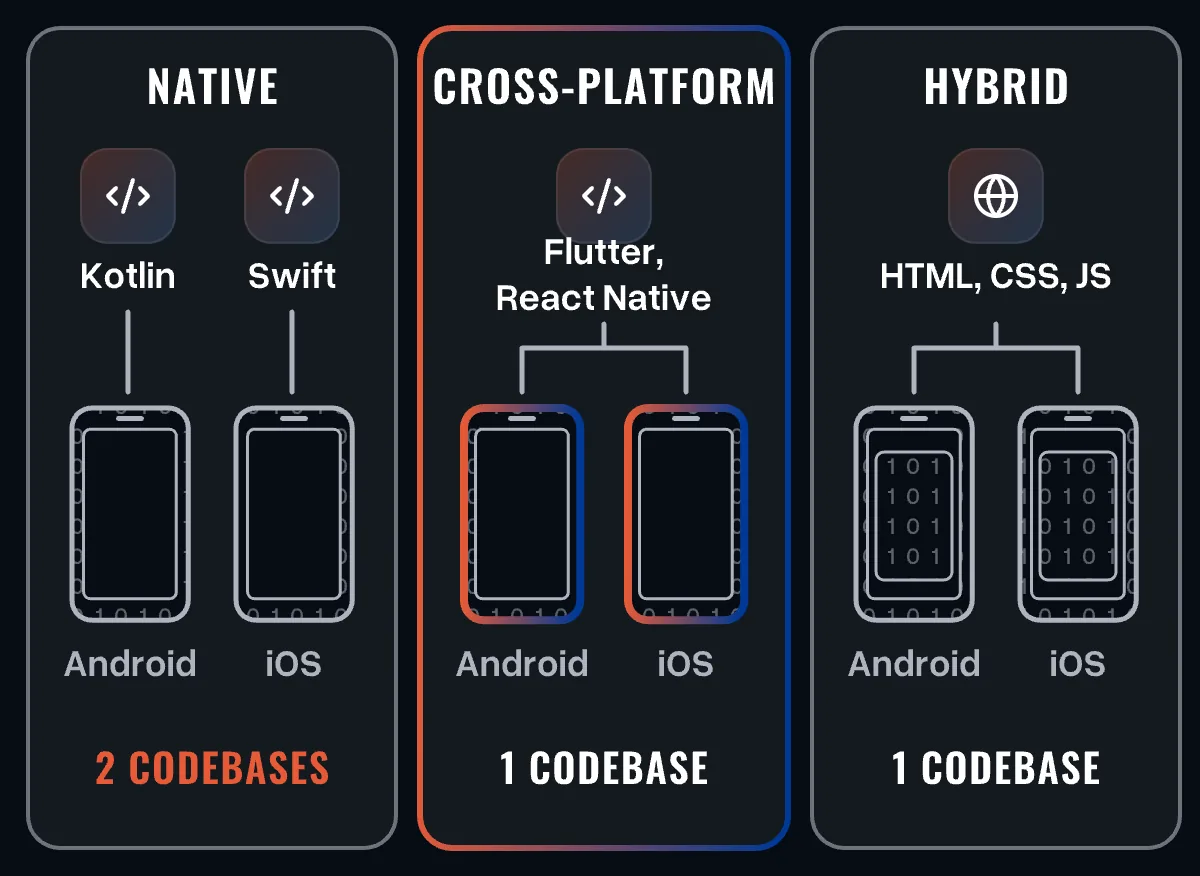
Native apps are built in the programming language of the operating system and run only on that system. For Android that was traditionally Java; today Kotlin is the standard for new projects. For iOS the native languages are Swift and, in older codebases, Objective-C.
Native development uses the full potential of the operating system and enables features that other approaches cannot always reach.
Advantages of native apps
- Performance: native apps run fast and smoothly.
- User experience: developers can use the platform's own design language, UI elements and gestures, so the app feels natural.
- Features: full access to device hardware and platform functions.
- Updates: new platform features can be adopted directly.
Disadvantages of native apps
- Time and cost: you are essentially building two apps for two platforms, which can come close to doubling effort and time.
- No code reuse: the source code of one platform cannot be used for the other.
- Complexity: native development needs specialised skills for each platform.
Native technologies
Kotlin for Android: Kotlin is a statically typed language that is fully interoperable with Java and needs less boilerplate code. Development happens in Android Studio, Google's official IDE for Android.
Swift for iOS: Swift is Apple's language for iOS, macOS, watchOS and tvOS. It has largely replaced Objective-C for new projects because of its performance, its community and Apple's support, which also makes Swift developers easier to find. Development happens in Xcode, Apple's official IDE.
Cross-platform app development
Cross-platform development means building one app from one codebase that runs on several platforms, usually Android and iOS. This saves the cost, time and effort of building and maintaining separate apps, which is why it is a common choice for small and mid-sized companies.
Advantages of cross-platform apps
- Cost: one team and one codebase instead of two.
- Code reuse: the same code serves several platforms.
- Time to market: faster development and release on all platforms.
- Consistent experience: features and UX stay the same when users switch devices.
Disadvantages of cross-platform apps
- Platform features: some native design elements and device functions are harder to use, although this gap keeps shrinking.
- Performance: in demanding cases there can be a noticeable difference to native apps.
- Customisation: options are limited by the framework you choose.
Cross-platform technologies
React Native: React Native is an open-source framework launched by Facebook and based on JavaScript. It renders native UI components, offers an experience close to native apps and has a large developer community with good documentation.
Flutter: Flutter is Google's open-source framework. It draws its own interface, which allows fluid, consistent UIs, and uses the Dart language, which compiles to native code. Flutter apps are quick to build and to update.
Hybrid app development
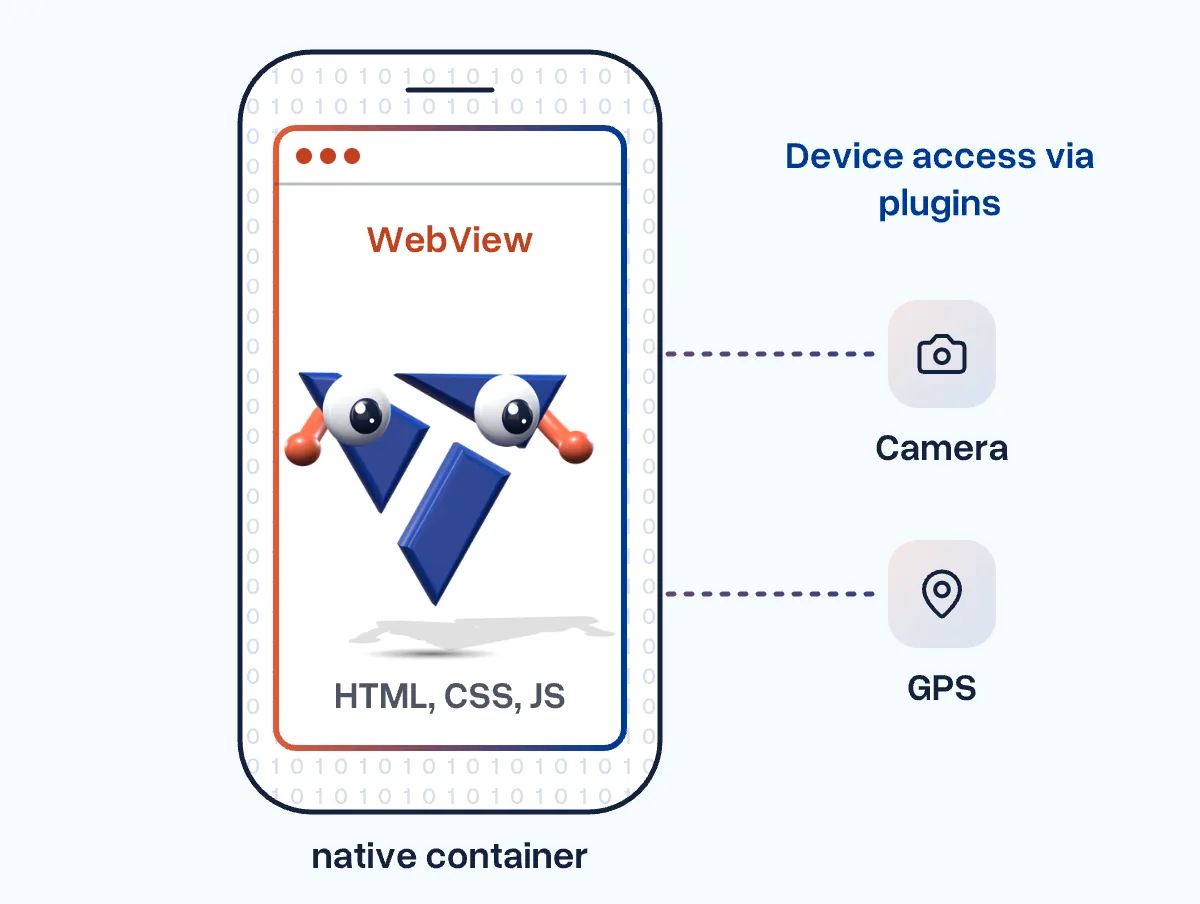
Hybrid apps are built with web technologies such as HTML, CSS and JavaScript and wrapped in a native container (a WebView) that displays the interface and gives access to device functions. This speeds up development and lowers costs considerably.
Advantages of hybrid apps
- Development time: easy to build, release and maintain - the fastest way to reach many users.
- Cost: a fraction of native development.
- Code reuse: the same app can be wrapped for each mobile platform and even the web.
Disadvantages of hybrid apps
- Performance: web technologies need more resources, which can make the app feel slow on phones.
- User experience: platform-specific UI is hard to achieve, so hybrid apps often feel different from other apps.
- Dependencies: access to device hardware often relies on third-party plugins, which may be outdated.
Hybrid technologies
Ionic: Ionic is an open-source framework for building apps with web technologies. Its UI components give a near-native look and feel. Because it builds on familiar web skills, developers are easy to find and development costs tend to be low.
Which approach is right for you?
Each approach has its strengths, which makes each one right for different situations:
- Hybrid: when the budget is tight, launch is urgent and you need to reach many users quickly.
- Native: when user experience matters more than a fast launch, the budget allows it and a team is available to maintain apps for each platform.
- Cross-platform: when the budget is limited but you want a user experience close to native.
| NativeKotlin, Swift | Cross-platformFlutter, React Native | HybridIonic with Capacitor | |
|---|---|---|---|
| Performance | strong | medium | limited |
| User experience | strong | medium | limited |
| Access to device features | strong | medium | limited |
| Rolling out updates | medium | strong | strong |
| Development time | limited | medium | strong |
| Cost | limited | medium | strong |
| Reusable code | limited | strong | strong |
| Low complexity | limited | medium | strong |
Not sure which fits your product? Talk to us - we will look at your goals, users and budget and recommend the approach that fits. More on our mobile app development.