

A progressive web app (PWA) promises the reach of the web with the feel of an app: one code base, no app store, installable on any smartphone. That sounds like the cheaper route to an app, and sometimes it is. But on the iPhone in particular, a PWA has limits you should know before you decide. This article explains what a PWA is, what it can and cannot do in 2026, how it compares with cross-platform and native apps, what that means for costs and maintenance, and how to choose.
- A progressive web app is a website with a manifest and a service worker: installable, usable offline, push-capable, from one code base and without an app store.
- On the iPhone, PWAs can send push notifications since iOS 16.4, but only after installing; since iOS 26 every site added to the Home Screen opens as a web app.
- Safari does not support Bluetooth, NFC, USB or background sync for web apps, and the App Store rarely accepts a wrapped website.
- Apple's 2024 plan to remove Home Screen web apps in the EU was withdrawn; PWAs work in the EU in 2026.
- PWA for reach and fast updates, cross-platform app (e.g. Flutter) for reminders, store visibility and device functions, native for deep platform integration.
Want to learn more?
In a free strategy call we answer your questions about cost, technology and process.
Book a callWhat is a progressive web app?
A progressive web app is a website that behaves like an app. Technically, two building blocks make the difference: a web app manifest, which tells the device the name, icon and start screen of the app, and a service worker, a small script in the background that can store content for offline use and receive push notifications.
For your users, this means: they open the PWA via a link or a search result, add it to their home screen if they like, and from then on it starts like an app, without a browser bar. Updates go live as soon as you publish them, without an app store review. And the same code runs on Android, iPhone and desktop.
What a PWA can and cannot do in 2026
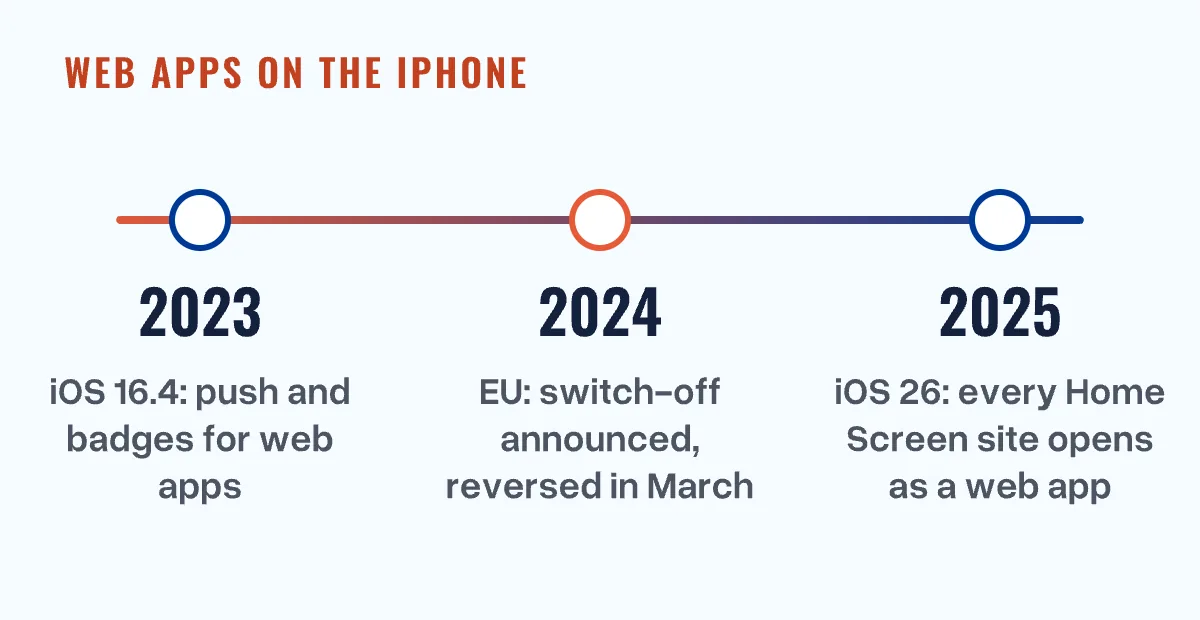
On Android, Chrome has supported PWAs for years, with an install prompt and push notifications that work even without installing. On the iPhone, Apple has caught up step by step: since iOS 16.4 (2023), web apps on the Home Screen can send push notifications and show a badge on the app icon. And since iOS 26 (September 2025), every website a user adds to the Home Screen opens as a web app by default, even without a manifest.
| Feature | Android (Chrome) | iPhone (Safari) |
|---|---|---|
| Install on the home screen | Yes, with the browser's install prompt | Yes, via Share > Add to Home Screen |
| Start without browser bar | Yes | Yes; since iOS 26 for every site added to the Home Screen |
| Work offline | Yes, via a service worker | Yes, via a service worker |
| Push notifications | Yes, even without installing | Yes, since iOS 16.4, only after installing |
| Bluetooth, NFC, USB | Yes, via web interfaces in Chrome | No, Apple rejects these interfaces |
| Listing in the app store | Google Play via a Trusted Web Activity | Only with value beyond a website |
The table shows where the limits are. Apple's browser engine WebKit officially opposes web interfaces for Bluetooth, NFC, USB and background sync, so they will not come to the iPhone via Safari. On Android, a PWA can be published in Google Play as a Trusted Web Activity. In Apple's App Store, a pure website in an app wrapper usually fails guideline 4.2: an app must offer more than a repackaged website.
One worry is no longer valid: Safari deletes data that websites store if a site is not used for seven days, but according to WebKit this limit does not apply to web apps on the Home Screen. Logins and offline data are kept there.
PWAs in the EU: what the Digital Markets Act changed
In early 2024, Apple announced that it would switch off Home Screen web apps in the EU with iOS 17.4, citing the Digital Markets Act (DMA), which obliges Apple to allow other browser engines in the EU. After strong criticism, Apple reversed the decision a few weeks later, in March 2024. Since then, PWAs on the iPhone work in the EU as everywhere else, and with iOS 26 Apple has even extended them.
What the DMA did change: since 2024, browsers in the EU may use their own engines instead of WebKit. Whether this will bring additional web app features to the iPhone is open. For planning in 2026, work with what Safari can do today.
PWA, cross-platform or native: the comparison
The decision is rarely 'PWA or native'. In practice there are three routes, and each one fits different products:
-
Progressive web app
- Code base
- One web code base for browser, Android and iPhone
- Distribution
- Link, search engine, home screen; Google Play optional
- Device access
- Camera, location, offline and push; on the iPhone no Bluetooth, NFC or background tasks
- Fits
- Products people find via Google or a link and use occasionally, internal tools, a first mobile step for an existing web app
-
Cross-platform app (e.g. Flutter)
- Code base
- One code base for iOS and Android
- Distribution
- App Store and Google Play
- Device access
- Almost all device functions, native modules where needed
- Fits
- Most apps that users open regularly and that need reliable push, in-app purchases or store visibility
-
Native app (Swift, Kotlin)
- Code base
- A separate code base per platform
- Distribution
- App Store and Google Play
- Device access
- Full access to every device and platform function
- Fits
- Apps that use one platform's functions very deeply, or have the highest performance demands
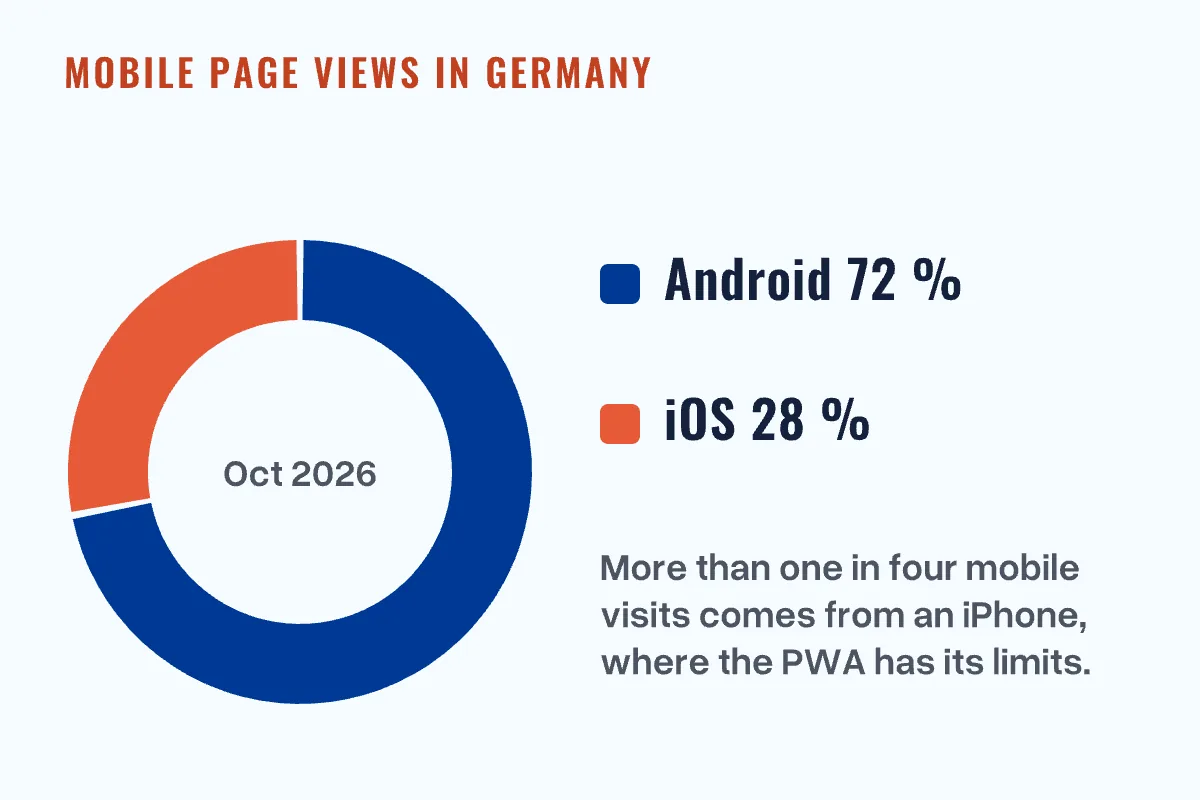
Why the iPhone matters even where Android dominates: according to StatCounter, 72 % of mobile page views in Germany came from Android in October 2026 and almost 28 % from iOS. More than one in four mobile visitors uses an iPhone, and that is exactly where the PWA has its limits. How native, cross-platform and hybrid apps differ in detail is explained in Native, cross-platform or hybrid.
Costs and maintenance
A PWA is usually the cheapest route if you need a web application anyway: the mobile version is created from the same code base, there is no store submission, and updates are live immediately. A cross-platform app adds the store work for two platforms, but still has only one code base. Native costs the most, because every feature is built twice.
The difference grows after the launch. Store apps have to keep up with the platforms: since 28 April 2026, Apple only accepts uploads built with Xcode 26 and the iOS 26 SDK, and from 31 August 2026 Google Play requires new apps and updates to target Android 16. A PWA avoids these deadlines, but has to be tested again with every major browser update, especially in Safari.
Which route costs what for your project depends on the features, not the label. Our cost calculator shows you a range for web app and app in a few minutes.
Decision guide: which route fits your product?
| If ... | then rather |
|---|---|
| Users find you via Google or a link and use the product occasionally | PWA |
| You already have a web app and want it on the smartphone quickly | PWA as a first step |
| Internal tool for your team, also offline in the field | PWA |
| Push reminders are central and many users have an iPhone | Cross-platform app |
| You want visibility in the app stores or in-app purchases | Cross-platform app |
| Bluetooth, NFC, sensors or location in the background | Cross-platform or native |
| Deep integration with one platform, e.g. HealthKit or widgets | Native, or Flutter with native modules |
A sensible path for many products: start as a PWA, measure how often people use it, and switch to an app when usage and requirements justify it. If you are not yet sure whether you need an app at all, our article Do you need a mobile app? helps.
How Vitec helps you choose and build
We are a software development partner from Stuttgart and build both: progressive web apps with Angular and apps for iOS and Android with Flutter from one code base, natively with Swift or Kotlin only when a device function requires it. That is why we have no reason to talk you into one route. We tell you before the start which route fits your product, based on your users, the features you need and the costs over the whole lifecycle.
We then design, build and run the solution as one team, including push notifications, offline mode, store releases and updates. More on our pages for web development and mobile app development, where you can also book a free strategy call.
Conclusion
A progressive web app is a strong choice in 2026 when reach, fast updates and one code base matter more than deep device access. On Android it comes very close to an app; on the iPhone it works well, but push only after installing and without Bluetooth, NFC or background tasks. If your product lives on reminders, store visibility or hardware, a cross-platform app with Flutter is usually the better route. Decide by your users and your features, not by the technology.